FAQs · RBI rules from 1 January 2027

RBI Rules on Locking Financed Phones, Explained

Can a lender lock a phone bought on EMI? When, how, and what must still work? Plain answers for borrowers and lenders, plus how Loksiz helps lenders stay within the rules.
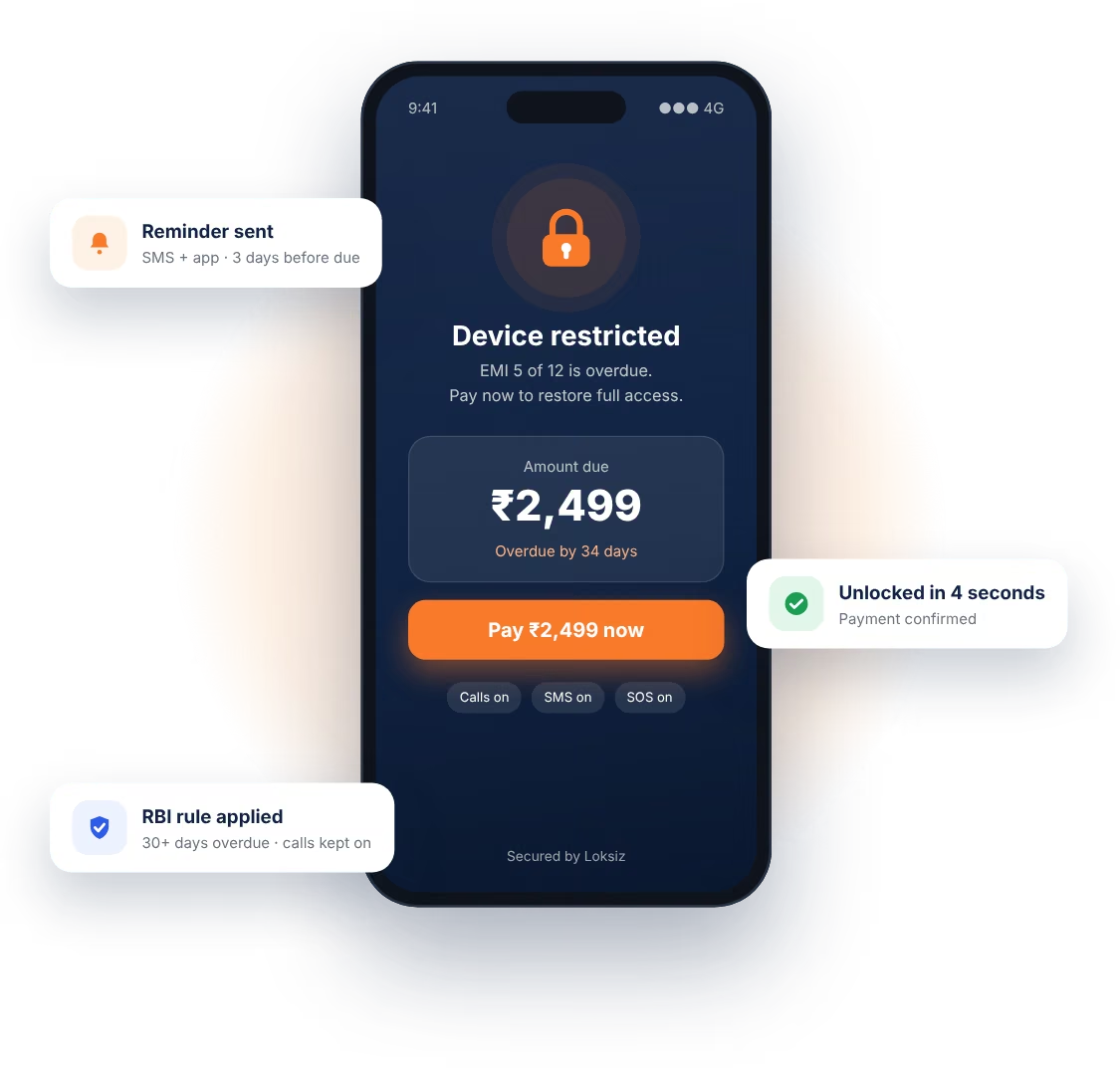
Locked financed phone with calls, SMS and SOS still working
  • 30 days Overdue before any restriction
  • 60 days Overdue before a full lock
  • 1 hour To unlock after payment
  • ₹250/hr If the lender is late

The Phone That Can't Be Locked Overnight

Ravi bought a smartphone on EMI for work, UPI payments and staying in touch with family. Like most borrowers, he didn't read the fine print, but later noticed a line saying "device restrictions" could be applied.

A few months later his salary was delayed and he missed an EMI. He worried his phone would be locked the next day, cutting him off from his employer, his bank apps and his family.

Under RBI's new rules, that can't happen. For the first 29 days the lender can only remind him to pay. Partial restrictions are possible only after 30 days and a notice, and a full lock only after 60 days. Even then, incoming calls, SMS, emergency SOS and work use must keep working, and nobody may look at his contacts, photos, messages, call logs or location.

When Ravi pays, the phone must be unlocked within an hour. If the lender is late without a valid reason, it owes him ₹250 for every hour of delay. A financed phone is still an essential device for the borrower, and the rules now say so clearly.

THE RULES AT A GLANCE

What a Lender Can Do, and When

0–29 days overdue

Reminders only

Calls, SMS and notifications to remind you. No restriction of any kind.

30–59 days overdue

Partial restriction

Only after notice. Outgoing calls still can't be blocked.

60+ days overdue

Full lock allowed

Incoming calls, SMS, emergency SOS and work use must still work.

After payment

Unlock within 1 hour

Late unlocks cost the lender ₹250 per hour, up to the loan amount.

FREQUENTLY ASKED QUESTIONS

Find Your Answer by Topic

57 questions in 10 topics. Pick a topic to see only those questions.

General

Yes, but only under strict RBI rules. A lender can restrict only the exact device that the loan paid for, only if your loan agreement allows it, and only after the waiting periods described under Locking timeline.

The new rules apply from 1 January 2027.

To stop aggressive recovery practices and address complaints about digital lenders locking financed phones. The rules set clear limits on when and how a device can be restricted.

No. A lender cannot lock your phone to recover a personal loan, car loan, home loan or any other loan, even if you have missed several payments. Only the device financed by that specific loan can be restricted.

No. If your phone was financed by one lender, another lender cannot lock it to recover an unrelated loan.

Yes. The rules apply to devices bought on a loan, including phones, tablets and laptops.

They apply to lenders regulated by RBI. Many loan apps and BNPL services lend through a partner bank or NBFC, and that regulated partner is responsible for following the rules.

An unregistered app cannot legally lock a device financed by a regulated lender. RBI has repeatedly warned the public against unauthorised digital lending apps. Do not pay under threat, save the messages, and report the app to the police cyber cell or to RBI's Sachet portal (sachet.rbi.org.in).

Locking timeline

For the first 29 days overdue, the lender can only remind you to pay. From 30 days overdue, and only after giving you notice, partial restrictions can be applied. A full lock is allowed only after 60 days overdue.

No. One missed EMI is not enough. The lender must wait until your account is at least 30 days overdue and must notify you first.

Only after your account is more than 60 days overdue. Even then, essential functions such as incoming calls, SMS and emergency SOS must keep working.

Yes. The lender must give you notice and a chance to pay before restricting your device.

Not before your account is 60 days overdue.

What must still work

Incoming calls, SMS, emergency SOS calls and work-related use. These cannot be blocked at any stage.

No. You must always be able to receive calls and SMS, even when the device is fully locked.

No. Emergency SOS must always remain available.

No. Device restrictions must not stop you from doing work-related activities.

Tell your lender immediately, in writing if possible, and save screenshots or other evidence of the problem. If it is not fixed, raise a complaint with the lender's grievance officer.

Privacy

No. The lender and its technology provider cannot access personal data on your device, including contacts, photos, videos, SMS, call logs or location.

No. They cannot access your contacts or message them to recover money.

No. They cannot track your location or location history.

Only what your loan agreement allows: restricting and unlocking the financed device for the reasons stated in the agreement. It must not collect or view your personal information.

Unlocking and compensation

Within 1 hour of your overdue payment being received.

If the delay is the lender's fault, they must compensate you ₹250 for every hour of delay, up to the loan amount.

You can claim ₹250 per hour for a wrongful restriction, up to the loan amount.

No. Compensation applies when the lender is at fault, for example if the device is not unlocked within 1 hour of payment or was restricted wrongly. A correct restriction under the rules does not earn compensation.

Save your payment reference (UPI receipt, bank SMS or payment receipt), the time you paid, and the time your phone was unlocked. Screenshots help.

The lender has to give up control of your device for good. They should also tell you how to remove the locking software, so the phone is completely yours again. If the lock is still there after your loan is closed, raise it with the lender straight away.

Loan agreement

Yes. It must clearly state that the lender can restrict the device and explain how.

Yes. They must tell you, when the loan is sanctioned, that the device can be restricted.

No. The software may only do what the loan agreement allows, and it must not access your personal information.

If the device manufacturer or operating system provider offers a certified locking method, the lender or its service provider should use it. The rules do not spell out what happens if no certified option exists.

It should tell you, in words you can follow, that the device can be restricted, when that can happen, how restrictions build up in stages, how you'll be told beforehand, how unlocking works once you pay, and who to contact if something goes wrong. If any of that is missing or unclear, ask before you sign.

Complaints and recovery calls

First, write to the lender's grievance officer. If your complaint is not resolved within 30 days, you can escalate it to the RBI Ombudsman at cms.rbi.org.in.

Only between 8am and 7pm, unless you have asked them to contact you at another time.

Yes. Recovery calls must be recorded, kept for at least 6 months, and you must be told the call is being recorded.

Not necessarily. The commercial bank version of the rules may not apply in the same form to small finance banks, payments banks, regional rural banks or local area banks. Check what type of lender you have and ask them in writing which rules they follow.

Use your lender's complaint process. If it is not resolved within 30 days, escalate to the RBI Ombudsman at cms.rbi.org.in.

Before buying on EMI

Check that the loan agreement says whether the device can be locked and how, what happens if you miss an EMI, the total cost of the loan, and how to make a complaint.

Who is the lender? Does the agreement allow them to lock the device? What is the total cost? How do I close the loan early? Who handles complaints? Ask for a copy of the agreement.

Pay your EMIs on time, set up auto-debit, keep an emergency fund of a few EMIs, and contact the lender early if you think you will struggle to pay.

Yes, it can. The lock itself is not what affects your score, but a missed EMI can be reported to credit bureaus and lower your credit score.

For lenders

A loan agreement that clearly allows device restriction, a device linked to that specific loan, notice sent to the borrower, and the correct waiting period passed: no restriction before 30 days overdue and no full lock before 60 days.

No. RBI expects recovery to be governed by the board. Each lender needs a detailed, board-approved recovery policy.

Log the time each payment is received and the time each device is unlocked. If an unlock takes longer than 1 hour, record it, so any ₹250-per-hour compensation can be calculated correctly.

Incoming calls, SMS, emergency SOS and work-related use. Check every restriction template before it goes live.

Only the minimum needed: enrollment, payment status, reminders and device policy. Not contacts, photos, videos, SMS, call logs or location.

Before anything happens, your system should check that the device is actually financed by that loan, that the agreement and notice are in place, and that the days past due are worked out correctly. Restrictions should step up gradually and never touch calls, SMS, SOS or work use. Payments need to reach the lock system straight away so unlocks happen within the hour, and every action should be logged, with a way to track compensation and complaints.

Because the 1-hour unlock clock starts when the payment is received. If payments only sync in a nightly batch, a borrower who pays at 10 in the morning could stay locked until the next day, and you'd owe compensation for every one of those hours. Sending each payment as it happens, through a webhook or API call, lets the unlock go out right away.

It's a time-stamped record of everything the system did: checking the device and loan, sending notices, when a restriction started and how strict it was, when the payment came in, and when the unlock was requested and completed, along with who or what did each step. If a borrower complains or an auditor asks questions, it's how you show you followed the rules.

The lender stays responsible for following the rules. But the provider has to make that possible, with the right controls built into the product, limits on who can do what, fast payment handling and proper records. It's worth choosing a provider whose product is built around these rules, rather than one you have to work around.

About Loksiz

Loksiz links each financed device to its loan, tracks payments in real time, sends reminders, and applies restrictions only by the rules the lender sets, such as 30 and 60 day limits. It unlocks automatically on payment and keeps an audit log of every action.

No. Lenders set graduated rules: reminders only from 0 to 29 days overdue, partial restrictions from 30 days after notice, and full restriction only from 60 days.

Loksiz is designed for loan-related device control only. It is not used to view contacts, photos, videos, SMS, call logs or location.

Payment webhooks trigger the unlock automatically, usually within seconds of payment confirmation, which helps lenders meet the 1-hour rule.

The lock or unlock command waits in a queue and runs as soon as the phone reconnects to any network.

Yes. Key events are logged, including enrollment, overdue stage, notices sent, restrictions applied, payments received and unlocks, so lenders can show their process followed the approved policy.

FOR LENDERS

How Loksiz Helps You Lock Devices Within the RBI Rules

Loksiz is a device financing risk management (DFRM) platform. It links each financed device to its loan, tracks payments and applies restrictions only by the rules you set.

Only lock the financed device

Each device is linked to its loan and IMEI at enrollment, so a restriction can only apply when there is a valid, active device loan. A phone can't be locked over a personal, vehicle or home loan.

30 and 60 day rules

Lenders set rules by days overdue: reminders only at 0–29 days, partial restrictions at 30–59 days after notice, and full restriction from 60 days.

Essential functions stay on

Restriction profiles are built so calls, SMS, SOS and work use stay available. Lenders review each template before it goes live.

Fast, automatic unlock

Payment webhooks trigger the unlock automatically, with real-time status, to help meet the 1-hour rule without manual work.

No access to personal data

Only enrollment, payment status, reminders and device policy data are used. Not contacts, photos, SMS, call logs or location.

Complete audit trail

Every key event is logged: enrollment, overdue stage, notice sent, restriction, payment received and unlock, with who did what and when.

Notice before restriction

SMS, push and IVR reminders go out before any restriction, and rules can require a logged notice before a device is touched.

COMPARISON

What Loksiz Does Differently

A plain look at how each part of Loksiz works, and why it helps you stay within RBI's rules.

What it coversHow Loksiz does itWhy it matters under RBI rules
Linking each phone to its loanWhen a phone is sold on EMI, it's enrolled at the counter through our app, API or Android SDK and tied to that loan and its IMEI.Only the phone bought with that loan can ever be restricted. A personal, car or home loan can't trigger a lock.
Acting on payments, not guessworkLoksiz follows repayments as they happen and updates the phone the moment the loan status changes.You can follow RBI's 30-day and 60-day steps, instead of locking someone out after a single missed EMI.
Unlocking on its ownAs soon as a payment comes through, the phone unlocks automatically. Nobody on your team has to press a button.Meeting the one-hour unlock rule becomes much easier, even late at night or on a holiday.
Reminding before restrictingBorrowers get SMS, app notifications and voice-call reminders throughout the repayment cycle.People get a fair warning and a real chance to pay before anything on their phone is restricted.
Fitting into your systemsLoksiz plugs into your loan, POS and payment systems through simple APIs and SDKs.Your team sets the rules and keeps the records, so compliance stays in your hands, not the vendor's.
Built only for device financingIt's made for phones sold on EMI, not adapted from general office device management.Setting up EMI workflows, risk alerts and recovery steps is simpler, because that's exactly what it's built for.

BEFORE YOU GO LIVE

Compliance Checklist for Lenders

Loksiz gives you the controls. Your loan agreements, notices, restriction templates and records complete the picture. Check these before launching any device-locking program.

Talk to Our Team
  • No restriction before 30 days overdue, and no full lock before 60 days
  • Every restriction profile keeps calls, SMS, SOS and work use available
  • Devices unlock within 1 hour of payment, with times logged
  • No access to contacts, photos, messages, call logs or location
  • Certified OEM or OS locking used where available
  • Loan agreement clearly explains device restriction
  • Audit trail, data residency and incident handling meet your compliance needs
  • Offline devices, factory reset and work use tested in a pilot

This page summarises RBI's rules on device restriction for financed devices in plain language. It is general information, not legal advice. Always check the latest RBI directions and your loan agreement. For complaints, use your lender's grievance process or the RBI Complaint Management System at cms.rbi.org.in.

Building Compliant, Transparent and Technology-Driven Device Financing Solutions

For NBFCs, fintech companies and mobile dealers, connect with Loksiz to discuss your device-locking requirements.